
“Crews remember the ships they win in.”
— Fleet Admiral Selene Voss
Stars
Every hull design you fly earns its own mastery stars. A hull is one design: its faction, class and role, such as the Crimson Fleet Cruiser Tank. Each commander has their own count for each.
A hull earns a win each time a fleet it flies in wins a battle: against the Tide (patrols, signal ambushes, the incursion flagship), against another commander's fleet as attacker or defender, and a base raid as the attacker. One win per hull per battle, however many ships of it the fleet has. A ship lost in a battle its fleet won still counts. Losses count nothing, and neither does mining.
| Stars | Wins with the hull | Unlocks on that hull |
|---|---|---|
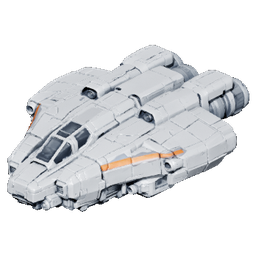
| ★ | 25 | Arctic |
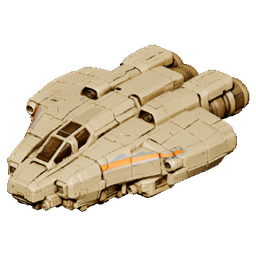
| ★★ | 75 | Sandstorm |
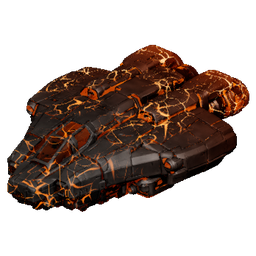
| ★★★ | 150 | Ember Wake |
| ★★★★ | 300 | Gunmetal |
| ★★★★★ | 600 | Void Black |
Stars never go away. Battles fought since 7 October 2026 count too, so a hull you have flown a lot already has its stars.
A hull with all five stars is mastered. Your commander profile shows how many hulls you have mastered, on the level line.
The mastery paints
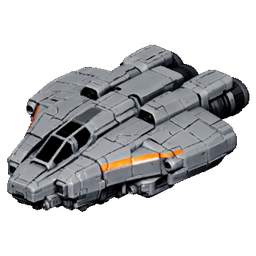
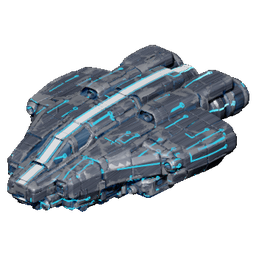
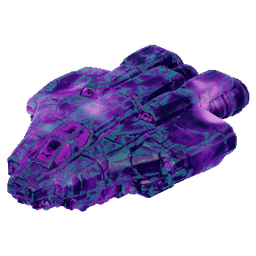
Each star unlocks a paint on that hull. Shown here on the Standard Bulwark.
| Paint | Needs | The look |
|---|---|---|
| Factory | Always | The hull as it was built, in its faction's colours |
| Arctic | ★ | White and icy blue-grey; the faction's colours stay, softened toward the paint |
| Sandstorm | ★★ | Desert tan and khaki, the same way |
| Ember Wake | ★★★ | Scorched black metal that heats up toward the stern, molten veins creeping slowly aft across the plates |
| Gunmetal | ★★★★ | Brushed gunmetal with polished edges and a blue circuit, a pulse of light running along it from bow to stern |
| Void Black | ★★★★★ | Black, with a violet and teal nebula drifting slowly inside the panels and an oil-slick sheen at the edges |
Faction paints
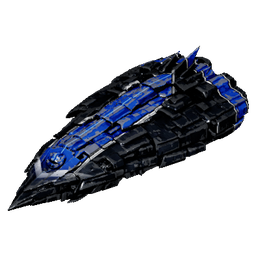
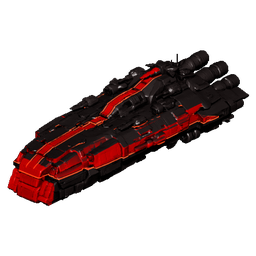
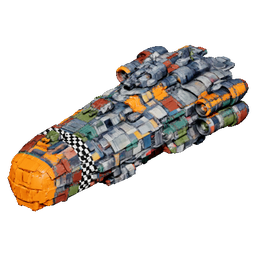
Each of the eleven contract factions has its own paint: a full livery in its colours, laid out to suit the faction's ships. You earn it by reaching Trusted (10,000 standing) with that faction through its contracts. It goes on that faction's hulls, any of them, with no stars needed. Once earned it is yours for good, and it appears in the paint row of each of the faction's hulls.
| Faction | Paint | The look |
|---|---|---|
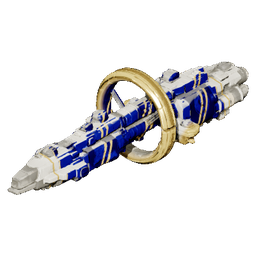
| Iron Vanguard | Iron Parade | Polished dark steel, a royal-blue spine with a white double pinstripe, white chevrons at the bow, blue and white engine bands |
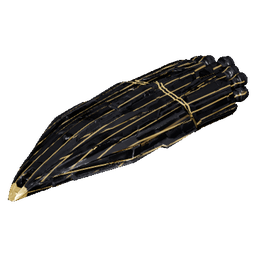
| Crimson Fleet | Blood Banner | A black hull with a crimson banner down each flank, cut into a swallowtail and edged with red light strips |
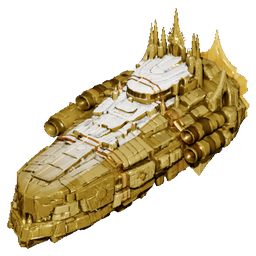
| Solar Empire | Sunforged | Polished gold, a white enamel spine with a glowing sun line, bronze rings |
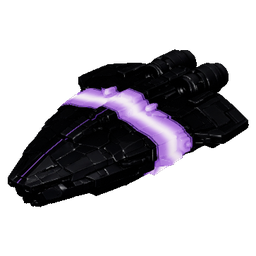
| Void Syndicate | Event Horizon | Matte black with one glowing ring round the hull, white-hot at its core and slowly swirling |
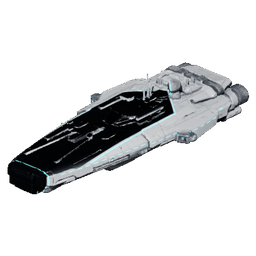
| Technocrat Union | Clean Room | Clean white, a graphite deck and nose edged in cyan light strips |
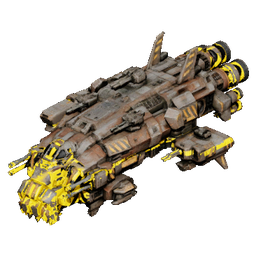
| Miner Rebellion | Hazard Pay | The ship's own worn plating with a safety-yellow nose, black hazard stripes and striped engine bands |
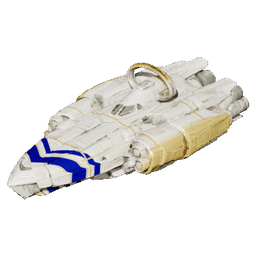
| Celestial Order | Ivory Halo | Ivory, a gold halo and gold rings, a royal-blue double chevron at the bow |
| Shadow Brokerage | Brass Ledger | Charcoal ruled with fine brass pinstripes, a brass band and nose |
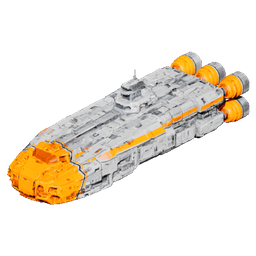
| Deep Space Explorers | Pathfinder | Survey white, a high-visibility orange nose, orange engine bands and an orange flank stripe |
| Nomad Clans | Clan Colours | Bone white, a royal-navy flank panel striped in gold, the wheel ring in gold |
| Freelancers | Salvage Ace | Patched with salvaged plates in olive, rust, primer and teal, a chequered band behind an orange nose |
The Tide's and Unaligned hulls have no faction paint.
Choosing a paint
Open the Shipyard. Above the ship, the HULL MASTERY strip shows the hull's stars, its wins and the next step. Under it, the PAINT row shows Factory, the paints the hull has earned, and the locked ones with the stars they need. The hull row at the bottom shows each hull's stars.
- Pick a hull on the BLUEPRINTS tab, or one of your ships on MY SHIPS.
- Click an earned paint in the PAINT row. It goes on at once.
- Click a locked paint to see it on the ship; the row says how many wins it still needs. Click it again to put the hull's own paint back.
A paint is chosen per hull: every ship of that hull, in every fleet, wears it. Changing it is free, and Factory is always there to go back to.
Paints are looks only: no paint changes any number.
Where paints show
On the Shipyard's ship, and on the pictures of your ships across the game: the Shipyard's lists, the Outfit screen, battle rosters and results. In battle your opponent and anyone watching see your paints, and replays keep them. On the sector map fleets are icons, so they show no paint there. The Tide's ships never wear paint.
Fleet Admiral Voss
She marks your first star, a hull's third star (Ember Wake), a hull mastered (Void Black) and each faction paint you earn at Trusted.